
Crossroads Controls & Habits
Input fundamentals for Place 1818 — keyboard, gamepad, and mobile habits that win free-for-all fights.
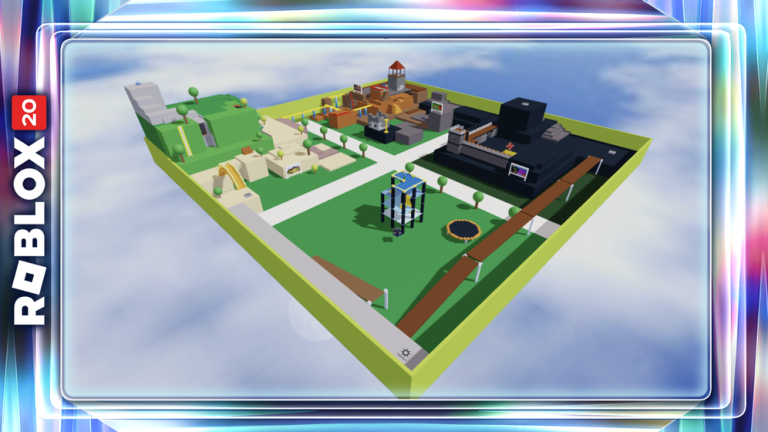
Why a controls page for a classic game?
Crossroads uses standard Roblox character movement, but BrickBattle punishes slow tool swaps and bad camera peeks harder than many modern experiences. This guide focuses on habits that transfer across keyboard, mouse, touch, and controller — not on inventing non-existent custom keybinds unique to Place 1818.
Pair this with Getting Started, the Map guide, and Weapons. For KO routes that assume clean swaps, see How to get KOs.
Default Roblox movement (all devices)
| Action | Typical PC | Typical mobile | Notes for Crossroads |
|---|---|---|---|
| Move | WASD | Thumbstick | Strafe while peeking bridges |
| Jump | Space | Jump button | Trampoline + jump timing at Tower |
| Camera | Mouse | Drag / gyro | Pre-aim before rounding Castle corners |
| Equip / tools | 1–0 / click toolbar | Tap tool slots | Practice Rocket↔Sword under stress |
| Primary use | Left click | Tap fire | Hold vs tap differs per tool feel |
Exact icons vary by Roblox client version and your settings menu. Open Settings → Controls in-client if a bind feels wrong after an engine update.
Tool bar discipline
Crossroads constantly changes what you hold. Strong players treat the toolbar like a mini inventory puzzle:
- Know slot order after each pickup so you are not hunting icons mid-duel.
- Pre-select Sword before entering Thieves’ Den interiors.
- Pre-select Rocket before peeking Castle bridges.
- Pre-select Superball when holding Temple sightlines.
- Never leave Paintball equipped “by accident” when an S-tier tool is available — see tier list.
Hybrid playstyles on the Players Hub are basically toolbar discipline plus map IQ.
Camera peeks that reduce deaths
- Jiggle peek corners: expose camera first, then body.
- On destructible maps, re-check sightlines after explosions — yesterday’s safe wall may be gone.
- At the Tower trampoline, keep camera ready for landing zones, not only the apex.
- When healing at a beacon, face the most likely approach lane before the heal finishes.
Beacon reminder: heal/recolor is good; a second different beacon can kill — Getting Started.
Weapon-specific control tips
Rocket Launcher
- Lead moving targets; splash the floor when leads are hard.
- Do not fire point-blank in closets — self-damage ends your KO streak (How to get KOs).
- After a miss, either hard-commit Sword or fully disengage — half-swaps get you sliced.
Superball
- Throw where the bounce will be, not only where the player is.
- Practice bank shots off Temple floors and Castle walls.
- Keep camera slightly elevated so you see carom paths.
Sword
- Approach already swinging in your mind — first contact timing wins.
- Strafe sideways; pure backpedal loses to aggressive lunges.
- Swap away if the enemy still has Rocket and you are in a long hallway with no cover.
Slingshot & Paintball
- Track horizontally with micro camera adjustments.
- Use Slingshot to chip; swap up for the finish.
- Paintball is last resort — Weapons.
Bomb / Timebomb
- Place with an exit path.
- Cook with awareness of your own walk-back speed.
- Great on stairs when you hear chase footsteps.
Trowel
- Place walls with gaps or angles so you can leave.
- Platforms help Superball angles near Tower — do not AFK on them during Hunt timers (Crossroads Tower).
- Rebuild after splash; one thin wall is a suggestion, not a fortress.
Mobile-specific advice
Mobile BrickBattle is viable if you:
- Enlarge touch controls in Roblox settings if thumbs block vision
- Prefer Rocket splash over flick Superball until aim feels good
- Jump-turn less frantically on trampoline to avoid camera spin deaths
- Consider a clip-on grip if long Hunt sessions cramp your hands
Controller notes
Controllers shine on movement and struggle on instant toolbar swaps. Bind or practice the tool switch control until Rocket↔Sword is muscle memory. Camera sensitivity slightly higher helps bridge peeks; too high ruins Superball banks.
Warm-up routine (three minutes)
- Spawn, grab any tool, swap every second while strafing a safe yard.
- Place two Trowel walls and leave through your own gap.
- Throw one Superball at a wall for a bounce.
- Fire one Rocket at terrain for splash feel.
- Queue a real fight with map intent.
Accessibility & settings checklist
- Graphics high enough to see beacon colors and hub Hunt icons
- Volume up for explosion cues
- Disable UI clutter that covers the toolbar if your device allows
- During The Hunt: Roblox 20, keep the quest counter visible while fighting
Related pages
- Getting Started
- Map guide
- Weapons
- How to get KOs
- Crossroads Tower
- Guides Hub
- Scripts — do not “fix” bad controls with cheats
Clean inputs will not aim for you, but dirty inputs will waste every S-tier spawn you find. Master the toolbar, peek with purpose, and let classic Crossroads feel readable instead of random.
Frequently Asked Questions
Quick answers to the most common questions.
Does Crossroads have unique keybinds?
It uses standard Roblox movement and tool controls. Master toolbar swaps and camera peeks rather than hunting secret binds.
What should I practice first on mobile?
Rocket splash aiming and reliable tool slot taps. Add Superball banks once movement feels stable.
How do I stop dying while swapping weapons?
Pre-select the tool before you peek, and drill Rocket↔Sword swaps in quiet moments between fights.
Any trampoline control tips?
Track landing zones with the camera, avoid panic spin, and fight people on the ground more than at the apex.
Where can I learn which weapon to equip when?
Use the Weapons guide and Tier List, then apply those choices with the habits on this page.